Your supplier dashboard,
at a glance
Not a manual, just a quick look at how things work once you join. Quote requests come to you, you set the price and the terms, and customers pay you directly.
How a booking works
Five steps from a customer's request to money in your account. Most of it happens without you lifting a finger.
A request lands
The date, the occasion and the full journey, with postcodes. You get an email too.
CustomerYou quote or decline
Type your price and send. It goes straight to the customer. Can't do it? Decline in one click.
YouThe customer compares
They see your quote with your photos, terms and what they pay today, side by side with others.
CustomerYou accept the booking
When the customer wants to book, you get a booking request to accept or decline. They can't pay until you accept.
YouBooked and paid
The payment goes to your Stripe account and you get the customer's details by email.
YouA quick tour of your dashboard
Everything sits in one place, in plain English.
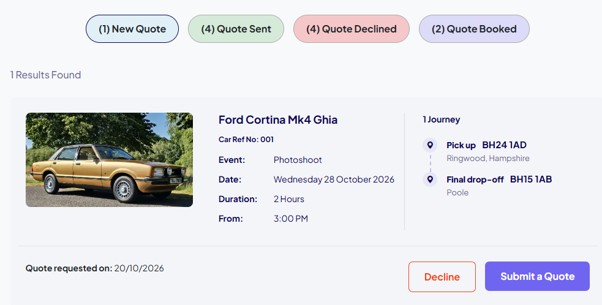
Every request, with everything you need to price it
New requests arrive on your dashboard with the date, type of event, start time, hire length and every pick-up, stop and drop-off.
Block out the days you can't do
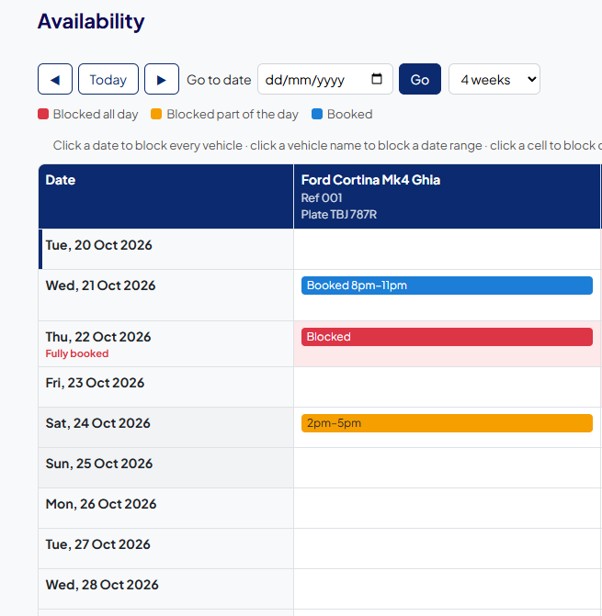
Off the road for a service? Not working over winter? Block a whole day, a date range, or just part of a day, like from 2pm for 3 hours.
- Bookings made through us block the calendar automatically
- Decline a request as "already booked" and that time is blocked for you
- Customers can't request a vehicle when it's blocked
Your deposit, your balance date, your rules
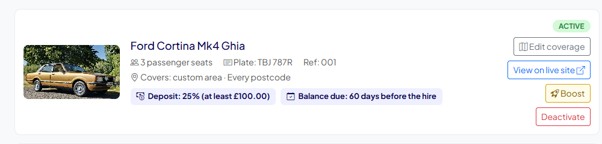
See all your vehicles in one list, with the payment terms you've set for each one.
- Deposit as a percentage of your quote, like 10%, 15% or 25%, with a minimum such as £100
- Balance due as many days before the hire as you choose
- Booked inside that time? The customer pays in full when they book
Only get requests for journeys you'll actually do
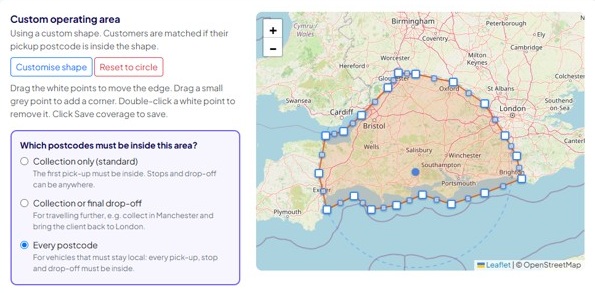
Set how far you'll travel from your base, or draw your own area on the map, like following the coast and skipping the bits you don't cover.
- Collection only: the first pick-up must be inside your area
- Collection or final drop-off: for longer one-way trips
- Every postcode: for vehicles that must stay local
Want more bookings? Boost when it suits you
Boosted vehicles show higher in search results with a "Promoted" label. Boost one quiet vehicle or all of them, for one special date or a whole season.
- You choose the rate: anything above your normal 8%, up to 30%. The higher the rate, the higher you show.
- Choose the dates and the days of the week, like Monday to Thursday from 1 December to 31 January
- The boosted rate only applies to bookings on those days. Change or remove it whenever you like.
Boost this vehicle
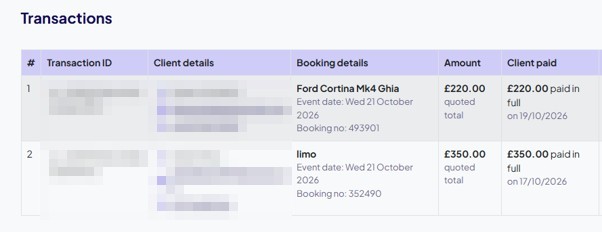
See every payment at a glance
Every booking with the customer's details, the quoted total and what they've paid, whether that's a deposit or the full amount.
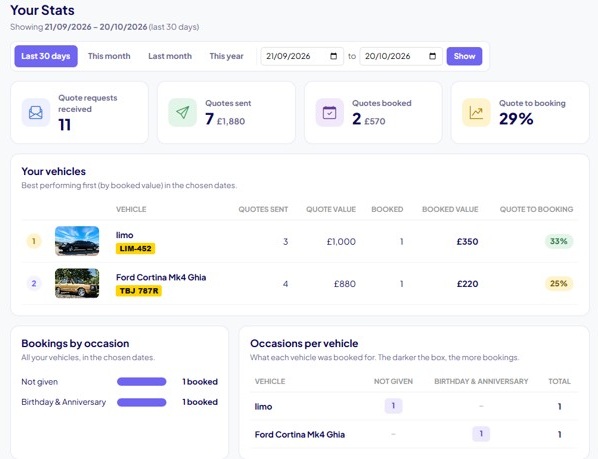
Know what's working
Requests received, quotes sent, bookings and how many of your quotes turn into bookings, by vehicle and by occasion, for any dates you choose.
You stay in charge
We bring you the customer and take the first payment for you. After that, treat it like any other booking of your own.
- You get an email with the customer's name, email and phone the moment they pay
- Send your own booking confirmation and paperwork
- Collect the balance the way you normally do
- Talk to the customer directly. We don't sit in the middle.
Simple, honest fees
No sign-up fee, no monthly fee and no other charges. You only pay when you get a booking.
Standard commission on each booking you take through Event Car Hire.
- Invoiced separately a few days after the booking
- Payable within 14 days of the invoice
- Boosted days are invoiced at the boosted rate you chose
| Your quote (paid to your Stripe) | £300.00 |
| Commission 8% | £24.00 |
| VAT on commission | £4.80 |
| Invoiced by us | £28.80 |
| You keep | £271.20 |
Stripe's own card fees apply to payments into your Stripe account.
What you'll need to get started
Most suppliers are set up in an afternoon.
Customers pay into it directly. There's a step-by-step guide in your dashboard.
Clear photos of each vehicle, inside and out. They're what customers look at first.
Seats, colour, year, the occasions you cover and where you'll travel.
Your deposit, minimum deposit and when the balance is due.
Questions suppliers ask
Do I have to quote every request?
No. Decline anything you can't or don't want to do. If you don't reply, we send you a reminder, and after a few days the request closes on its own so the customer can choose someone else.
When do I get paid?
When the customer books. Their deposit, or the full amount if the hire is inside your balance period, goes straight into your Stripe account.
Who collects the balance?
You do, the same way you do for your own bookings. We don't chase balances or send paperwork on your behalf.
What if I've already got the vehicle booked elsewhere?
Decline the request as "already booked" and we'll block that time in your calendar so you don't get asked again.
Can I take a vehicle off the site for a while?
Yes. Block the dates in your availability calendar and it won't be offered for those days.
Looks easy enough?
Tell us about your vehicles and we'll get you set up.